Last Updated on October 8, 2026
Most “BMS reset” searches come from one of three problems: your battery percentage reads wrong, your battery won’t turn on, or you just replaced a battery and the system is acting confused. This guide covers all three, with methods ranked from easiest to most advanced.
Start with a full charge–discharge calibration cycle — drain the device to shutoff, then charge to 100% without interruption, 2–3 times. If that doesn’t work, try a power cycle (disconnect all sources, wait, reconnect). For vehicles, you’ll likely need an OBD2 scanner.
What Is a BMS, and Why Reset It?
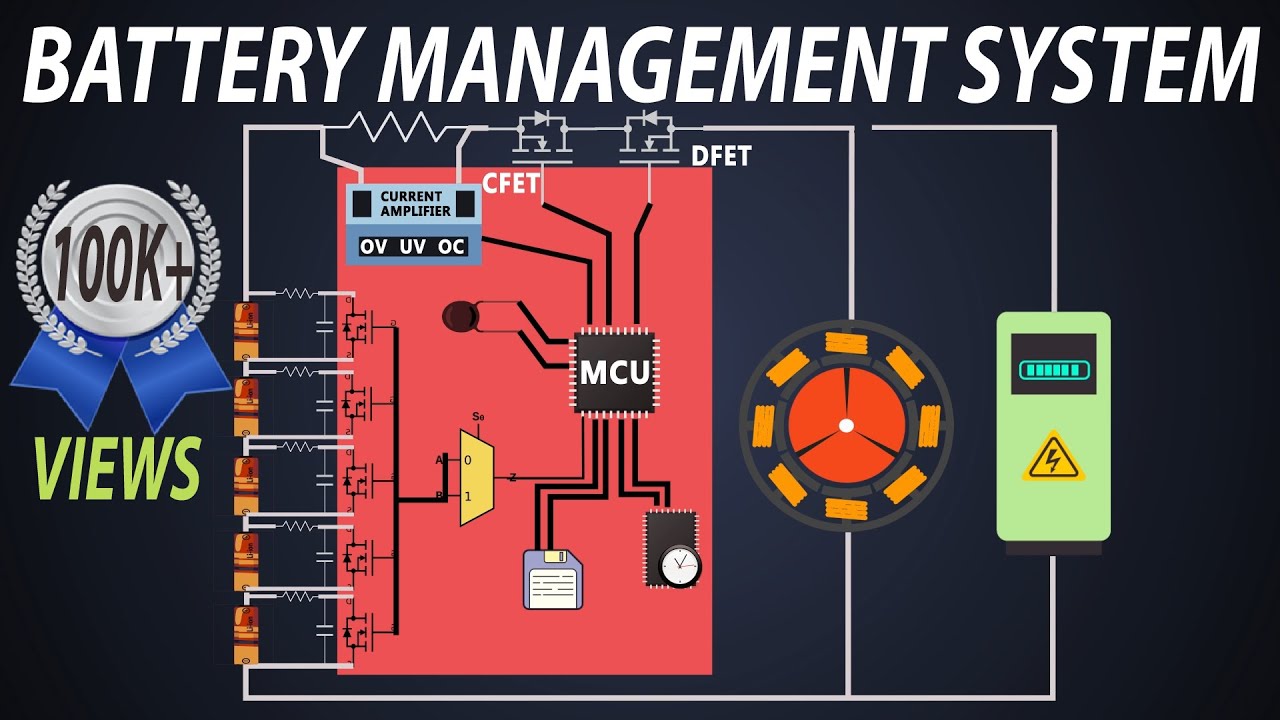
A Battery Management System (BMS) is a circuit built into every lithium-ion pack. It tracks cell voltage, temperature, and current, and protects the battery from overcharge, over-discharge, overheating, and short circuits — think of it as the battery’s brain.
Over time the BMS can lose calibration or enter a protective lockout. The three most common causes:
- Calibration drift — you always charge between 40–80%, so the BMS forgets what true 0% and 100% look like, and the percentage jumps or freezes.
- Protection-mode trigger — a deep discharge, overcurrent event, extreme temperature, or short circuit forces the BMS to cut output as a safety measure.
- Post-replacement mismatch — after swapping a battery, the controller still holds the old battery’s profile, causing charging errors or warning lights.
A reset clears these issues by forcing the BMS to relearn the battery’s real state.
Choose Your Method
| Method | Best For | Tools Needed | Time |
|---|---|---|---|
| 1. Charge–Discharge Cycle | E-bikes, e-scooters, laptops, power tools, EVs | None | 6–12 hours |
| 2. Power Cycle | LiFePO4, solar/ESS, portable power stations | Basic hand tools | 10–30 minutes |
| 3. OBD2 Scanner Reset | Cars, hybrids, post-2010 vehicles | OBD2 scanner | 5–10 minutes |
Method 1: Charge–Discharge Calibration Cycle (Safest, No Tools)
This is the only method recommended for ordinary consumer devices. It forces the BMS to relearn true capacity by observing a full charge/discharge event — per Battery University, partial charging causes the BMS to lose the reference points it needs to track true capacity.
- Discharge — Use the device normally until it shuts off on its own (ride the e-bike until the motor cuts out; let a laptop hibernate; run a power tool until it stops). For an EV, drive until the low-battery warning activates — don’t chase absolute 0%.
- Rest — Let the battery sit 5–10 minutes so residual voltage stabilizes.
- Charge to 100% without interruption, using the original charger. EV owners should temporarily remove any daily charge limit (e.g., 80%) for this cycle.
- Extended top-off — Leave it plugged in 1–2 hours after it reads full, so the BMS can balance cells.
- Repeat 2–3 times. Most units recalibrate in one cycle; some need 2 to 3 before the State-of-Health reading stabilizes.
- Verify — Battery percentage should move smoothly and runtime should return to normal. Then restore your usual charge limit for daily use.
Works when: Percentage is stuck or jumping, range/runtime reads wrong, or the battery has seen long stretches of partial charging.
Won’t work when: The battery is in permanent 0V lockout, or there’s hardware/cell damage.
Method 2: Power Cycle (Disconnect & Reconnect)
Best for standalone systems — LiFePO4 packs, off-grid solar, ESS, and portable power stations. Disconnecting fully discharges the BMS circuit’s internal capacitors, forcing a cold start.
- Isolate the battery — turn off all loads (inverter, appliances) and disconnect all charging sources.
- Wait at least 5–10 minutes (30 minutes for solar/ESS). A temporary fault sometimes clears on its own during this window.
- Reconnect — positive terminal first, then negative. (When disconnecting, always remove negative first, then positive.)
- Wake-up charge — connect a correctly configured charger delivering more than 1A; the BMS typically needs to detect a charging voltage before it will reopen the discharge circuit.
- Monitor — check indicator lights/fault codes clear, then apply a partial charge (~50%) and confirm cell voltages are balanced.
- Restore gradually — reconnect the inverter first, then loads and charging sources one at a time.
If the battery reads 0V and won’t accept a charge: It has likely locked out from severe over-discharge (cell voltage below ~2.5V). A standard charger may not even detect it. Your best option:
Use a charger with a “Lithium Activation” or “Force Charge” mode. If the battery still will not wake up, stop and contact our technical support team or a qualified technician, because forcing a deeply discharged lithium cell can be unsafe.
Works when: protection-mode lockout from over-discharge, overcurrent, or a temporary fault.
Won’t work when: there’s permanent cell damage or a persistent short.
Method 3: OBD2 Scanner Reset (Vehicles)
For cars, trucks, and hybrids made after 2010, this is the most precise method — the scanner talks directly to the BMS control module to execute a formal reset and clear the old battery’s stored profile. Modern vehicles track a detailed profile of the battery — voltage stability, charge acceptance, internal resistance, aging — and when a new battery goes in with an unfamiliar signature, the ECU can enter a protective mode: disabled start/stop, the charge light staying on, dim headlamps, or slow cranking. A reset tells the ECU to relearn from the new battery (OBD Profi).
- Get a compatible scanner that supports manufacturer-specific BMS service functions — sub-$30 generic ELM327 clones usually can’t do this. Options: Autel MaxiCOM MK808S, Foxwell NT530 (Ford/BMW), Innova 6100P.
- Locate the OBD2 port, usually under the driver-side dashboard.
- Connect with ignition ON, engine OFF.
- Navigate: Service Menu → Battery Service → BMS Reset (exact path varies by scanner/vehicle).
- Execute and follow the on-screen prompts.
- Verify the “days in service” counter has reset, then take a 10–15 minute test drive so the BMS can collect fresh drive-cycle data.
Brand notes:
- Ford: The free ForScan software (Windows PC + ELM327 adapter) offers full BMS reset capability.
- BMW: Use the Foxwell NT530 (~$80–$150) or INPA for dealer-level access.
- Audi/VW/Skoda: Requires “Battery Management Register” or “Recalibrate Battery” via VCDS.
- Mercedes: Uses “Battery Condition Reset” via StarDiagnosis.
Notes by Battery Type
Most of these follow Method 1 or 2 above — here’s what’s different for each:
E-Bike and E-Scooter BMS Reset
Method 1 is standard. If the display is frozen after a deep discharge, leave the original charger connected 30–60 minutes even if the light stays red — this can wake a sleeping BMS. Some packs have a small recessed reset button; check the manual. Afterward, clean the terminals — dust or moisture can cause voltage drops that trigger false errors.
LiFePO4 BMS Reset
Its flat discharge curve makes calibration especially important. Use Method 2 for protection-mode resets (undervoltage below ~10V for a 12V system, overvoltage beyond the BMS limit, overcurrent, or temperature extremes — exact thresholds vary by manufacturer, check your battery’s spec sheet). Temperature lockouts are self-correcting: move the battery back into the temperature range on its spec sheet and the BMS auto-resets. Avoid repeated deep discharges below 10%, and do a monthly 100% charge with 2–3 extra hours plugged in to balance cells.
48V Lithium Battery BMS Reset
Applies to e-bikes and solar/ESS. Use Method 1 or 2 depending on the application; for solar/ESS, Method 2 is standard. A light that flashes twice and turns off with a solenoid click usually signals a protection lockout — likely from over-discharge, cell imbalance, or a wiring fault.
Car, Hybrid and EV BMS Reset
Method 3 is standard, and essential after replacing the 12V auxiliary battery — without it the ECU keeps applying charge logic calibrated for the old battery. If your EV shows a “Service BMS” warning, that’s a fault code requiring diagnostic scanning — don’t attempt to clear it yourself; see a technician. Some EVs also offer a calibration option in the infotainment menu — check the owner’s manual first.
Laptop Battery BMS Reset
Method 1 applies. Check for a built-in calibration utility first (Dell, Lenovo, and HP all ship one). If runtime is still short after calibrating, the cells are likely degraded and the battery needs replacing.
Common Protection Triggers
| Trigger | What Happened | How to Reset |
|---|---|---|
| Undervoltage (UVP) | Drained below safe threshold (~10V for a 12V system) | Disconnect load, charge with >1A to full |
| Overvoltage (OVP) | Charging voltage exceeded the BMS limit (check the spec sheet; a 12V LiFePO4 pack normally charges at about 14.2 to 14.6V) | Disconnect charger, lower charge voltage, disable “equalize” mode |
| Overcurrent (OCP) | Load drew more current than the BMS allows | Reduce load, disconnect high-draw devices, reconnect |
| Over-temperature | Battery outside the charge or discharge temperature range on its spec sheet | Move to a moderate temperature; auto-resets when safe |
| Short circuit | Direct positive–negative contact | Fix the wiring fault, then charge >1A to reset |
Thresholds above are typical ranges, not universal specs — always check your battery’s datasheet.
What NOT to Do
CAUTION: Lithium-ion batteries store a lot of energy — opening a battery pack or tampering with the BMS circuit board can cause fire, explosion, or electric shock (UL Solutions).
| Advice You Might See Online | Why It’s Wrong |
|---|---|
| “Open the pack and disconnect the BMS” | In modern packs, the BMS is often soldered or spot-welded directly to the cells; forcing it open poses severe short-circuit risks. |
| “Short the BMS pins to reset it” | Can permanently destroy the control electronics and potentially trigger thermal runaway. |
| “Use a third-party BMS reset app” | Carries high risks of corrupting system firmware, bypassing safety checks, or introducing security vulnerabilities. |
| “Probe inside the pack or on the BMS board with a multimeter” | Opening the pack to reach the cells or the board risks an instant short circuit, arcing, or severe burns. Measure only at the external terminals. |
If a guide tells you to open the pack or disconnect internal wires, close it — that guide is dangerous.
After the Reset: Checklist
- Percentage changes smoothly (no jumping from 50% to 0%)
- Charging completes normally, on schedule
- No warning lights
- Runtime is back near spec
- Cell voltages are balanced (within 0.05V for LiFePO4, read from the BMS app or display)
If problems persist after 3 cycles or 2 reset attempts, it’s likely hardware — degraded cells, a faulty BMS board, or bad connections. Get a professional diagnosis.
Preventing Future Resets
A BMS reset is a troubleshooting tool, not routine maintenance.
- Avoid deep discharges — daily use in the 20–80% range suits most lithium chemistries.
- Charge fully to 100% about once a month. Run a full discharge and charge calibration only when the percentage reading drifts.
- Use the correct charger (a lead-acid charger’s “equalize” mode can trigger overvoltage protection on lithium).
- Store at 40–60% charge, with parasitic loads disconnected.
- Stay within the temperature range on the spec sheet, and avoid charging below 0°C.
- Check terminals periodically — loose or corroded connections cause voltage drops that trigger false errors.
Frequently Asked Questions
It clears stored calibration data and forces the system to relearn actual capacity, voltage thresholds, and charge curves. It recalibrates software — it doesn't repair hardware.
Only if the BMS locked out from over-discharge — a wake-up charge or power cycle can revive that. If cells are chemically depleted or physically damaged, no reset helps; replace the battery.
Only when you see clear calibration errors. A monthly full-charge cycle is healthy but not mandatory.
Methods 1 and 2, done correctly, are safe. Opening the pack, shorting pins, or using an incompatible charger can cause permanent damage or fire.
No, for consumer devices — Methods 1 and 2 need nothing but the original charger. Vehicles typically need an OBD2 scanner with BMS service capability.
No. That's a fault code requiring diagnostic scanning — see a qualified technician.
Charge–discharge cycle: 4–12 hours per cycle, 1–2 days for three. Power cycle: 10–30 minutes. OBD2 reset: 5–10 minutes plus a test drive.
A soft reset is the non-invasive power cycle described above — it clears temporary faults. A hard reset physically disconnects the BMS from the cells for a full memory restart; it carries more risk and should follow manufacturer documentation.
Conclusion
Most BMS issues aren’t hardware failures — they’re calibration drift or a protection lockout, and both are fixable at home with the right method. Start with the simplest option that fits your device: a charge–discharge cycle for e-bikes, laptops, and EVs; a power cycle for LiFePO4 and solar/ESS packs; an OBD2 scanner for vehicles.
If you’ve tried the matching method 2–3 times and the problem persists, that’s your signal to stop troubleshooting and get a professional diagnosis — at that point it’s very likely a hardware issue, and further DIY attempts (especially anything involving opening the pack) risk turning an inconvenience into a safety hazard.
Still Having Battery Issues, or Sourcing a New Pack?
If a reset doesn’t resolve the problem, it’s usually a sign the pack itself needs attention — degraded cells, a failing protection circuit, or simply an aging battery due for replacement. As a lithium battery manufacturer with 17+ years in LiFePO4 and custom pack design, Tycorun can help with:
- Custom LiFePO4 battery packs for e-bikes, energy storage, and low-speed EVs
- Battery support & maintenance service — technical support, BMS optimization, and troubleshooting from our engineers
- Contact our team to discuss your voltage, capacity, and application requirements — we typically respond within 24 hours
References
- UL Solutions. (n.d.). Functional safety of electronics and software used in energy storage products. https://www.ul.com/
- Battery University. (2010, August 26). BU-603: How to calibrate a “smart” battery. https://batteryuniversity.com/
- ALLDATA. (n.d.). System tests, relearns, resets, initializations and calibrations. https://www.alldata.com/
- OBD Profi. Battery Replaced? Why Start/Stop or Charging Acts Weird (Battery Management Reset Explained). https://obdprofi.com
- NHTSA Technical Service Bulletin, BMS Reset Procedure. https://static.nhtsa.gov/

A lithium-ion battery is only as reliable as the system managing it. This guide explains what a Battery Management System (BMS) does, how it works, the different types available, and what to look for when choosing a battery with a reliable BMS — whether you’re a first-time buyer or evaluating packs for a commercial application.

In this article, we will explore step-by-step how to replace battery terminal and some maintenance tips for battery terminals to increase battery life.

Battery leaking can be caused by various influencing factors. Therefore, understanding the causes, signs, dangers, and how to prevent and treat battery leaking is very important. In this article, we will discuss these in detail to increase users’ awareness of battery leaking.
Authors
-
View all posts
Ryder is a hands-on lithium battery specialist and technical content author with over five years of deep field experience in electric mobility infrastructure. He specializes in cell testing, pack diagnostics, and real-world Battery Management System (BMS) performance analysis. Having collaborated closely with top-tier R&D teams, Ryder excels at evaluating battery safety against stringent global standards like UN38.3 and IEC 62133. Through his articles, he aims to eliminate marketing noise, offering readers raw, data-driven insights into battery safety, performance, and lifespan optimization.
-
View all posts
Meg is a battery engineer with 10+ years of experience in the energy storage industry. She holds a B.S. in Electrical Engineering and previously worked as an R&D engineer at a lithium-ion battery manufacturer, where she focused on battery management systems (BMS), charging algorithms, and life-cycle testing for lead-acid, AGM, and lithium chemistries. She has contributed to the development of battery maintenance technologies used in commercial products. Meg now provides technical review for energy storage content to ensure accuracy, safety, and practical value for readers.